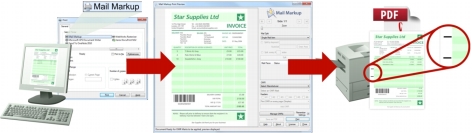
Operation With Mail Markup Office installed, the following sequence of operations is typically performed: 1. Documents are prepared in the normal way using an application such as Microsoft Word. 2. Mail Markup is then selected from the list of printers in the Application Print dialog (Fig. 4). 3. Mail piece detection and OMR mark options are configured in the Mail Markup Office interface (Fig. 3). 4. Mail pieces are detected, OMR marks are applied and the document is converted to a PDF document. 5. The PDF document is output using any printer installed in Windows. Fig. 1 Mail Markup Office operation