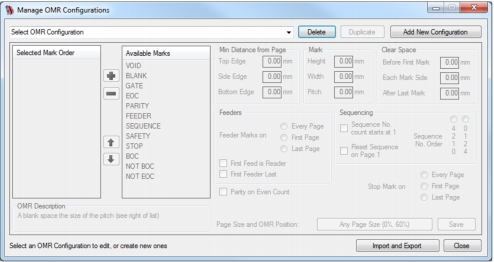
OMR configurations determine how OMR marks appear on a page and what feeders are available. They can be selected, added, edited, duplicated, imported, exported, saved and deleted in the Manage OMR Configurations dialog (Fig. 24) that is opened by clicking the Manage OMRs button in the Mail Markup Office interface (Fig. 3)
If OMR marks have already been applied to the current document, a Confirm Action dialog (Fig. 12) is opened asking you to confirm their removal before proceeding to the Manage OMR Configurations dialog.