OMR mark selection and order settings (Fig. 26) appear in the Manage OMR Configurations dialog (Fig. 24).
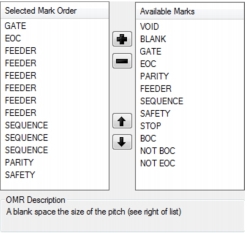
Available OMR marks appear on the right in the Available Marks list. These can be added to the Selected Mark Order list on the left then ordered and removed.
To add an OMR mark to an OMR configuration, perform the following actions:
To move an OMR mark up or down in the Selected Mark Order list, perform the following actions:
To remove an OMR mark from the Selected Mark Order list, perform the following actions: