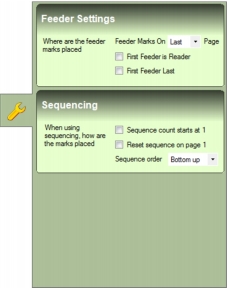
Feeder Settings OMR mark feeder settings appear on the Feeder sub-tab (Fig. 44) on the OMR Marks tab (Fig. 30). Fig. 44 Feeder sub-tab To open the Feeder sub-tab, perform the following actions: 1. Select, add, copy or import an OMR configuration. 2. Click the Feeder button (Fig. 45). Fig. 45 Feeder button The following feeder settings are provided: Setting Description Feeder Marks on Page Determines whether FEEDER marks are positioned on Every page, the First page or the Last page of each mail piece. First Feeder is Reader Indicates the first FEEDER mark is reserved for reading and causes the Feeder #1 check box on the OMR Marks tab to be disabled. First Feeder Last Indicates the first FEEDER mark is positioned after the last FEEDER mark.
