|
•
|
|
•
|
|
•
|
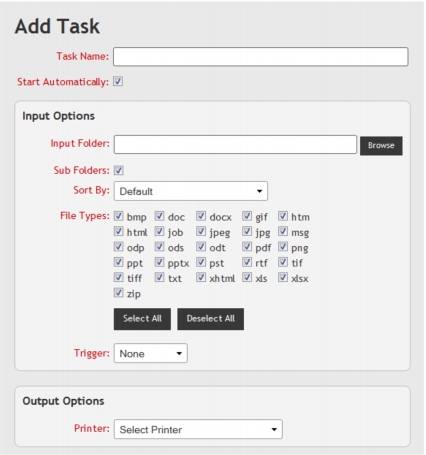
When adding or editing a Task, the following general configuration options are presented on the Add/Edit Task page (Fig. 17):
When adding or editing a Task, the following input configuration options are presented on the Add/Edit Task page (Fig. 17):
|
Determines the path and name of the folder that the Service monitors for supported documents and Job Files.
|
|||
|
Determines the Trigger that must be satisfied before the Service starts to process documents in the Watched folder.
|
|||
If a Watched Folder is remote from the PC/server where the Service is installed, it may not be accessible when Windows is logged off. To resolve this, refer to Known Issues > Unable to Use Remote Resources When Windows is Logged Off.
When adding or editing a Task, the following output configuration options are presented on the Add/Edit Task page (Fig. 17):
|
Output Folder^†
(Print to File) |
|||
|
Output Folder^†
(Convert to PDF) |
|||
|
A copy count specified for a document in a Job File is used instead of the Copies configuration option.
|
|||
If a printer or folder is remote from the PC/server where the Service is installed, it may not be accessible by the Service when Windows is logged off. To resolve this, refer to Known Issues > Unable to Use Remote Resources When Windows is Logged Off.
†NOTE:
The folder cannot be the same folder as the Watched Folder or a folder in a Watched Folder if the Sub Folders configuration option is selected.
