
Omnicomm Integration
A Smarter Way to Manage Business Communications
Integrate your own communication management solution that reduces costs, streamlines workflow and maintains existing processes

Overview
Omnicomm is a communication management solution that helps organisations create, process and deliver large volumes of business communications more efficiently.
It provides a central platform for managing communications that would traditionally involve separate processes for printing, posting and electronic delivery. Using Omnicomm, organisations can manage physical mail alongside email and messaging, helping to simplify communication workflows and reduce the amount of manual administration involved.
Omnicomm can be used for everything from individual letters and documents to high-volume, automatically generated communications. Typical uses include appointment letters, statements, invoices, notifications, reminders, correspondence and other documents that need to be delivered securely and reliably to customers, patients, residents, employees or other recipients.
Instead of users having to print documents locally, prepare envelopes, organise postage or manually transfer information between different communication systems, documents can be submitted to Omnicomm and processed through a controlled communication workflow.
How It Works
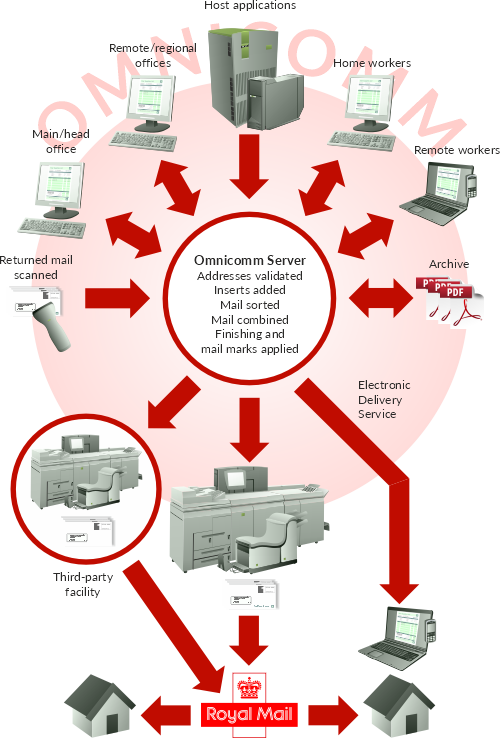
Omnicomm sits between the applications used to create communications and the channels used to deliver them.
A document or communication is first submitted to Omnicomm. This can be done manually by a user or automatically by another business system. Omnicomm can then process the communication according to predefined rules before preparing it for the required delivery method.
For physical mail, this can include preparing documents for centralised printing, sorting, folding, inserting and postal processing. For electronic communications, Omnicomm can manage delivery through email and messaging.
This provides organisations with a common process for handling communications regardless of where they originate or how they are ultimately delivered.
Designed to Work Around Your Organisation
One of the key strengths of Omnicomm is that organisations do not have to completely change the way they create documents in order to use it.
Staff can continue working with familiar applications, while existing business systems can continue generating documents automatically. Omnicomm provides several different ways for those documents and communications to enter the platform.
This means Omnicomm can support straightforward user-led processes as well as highly automated communication environments.
Components
Web Interface
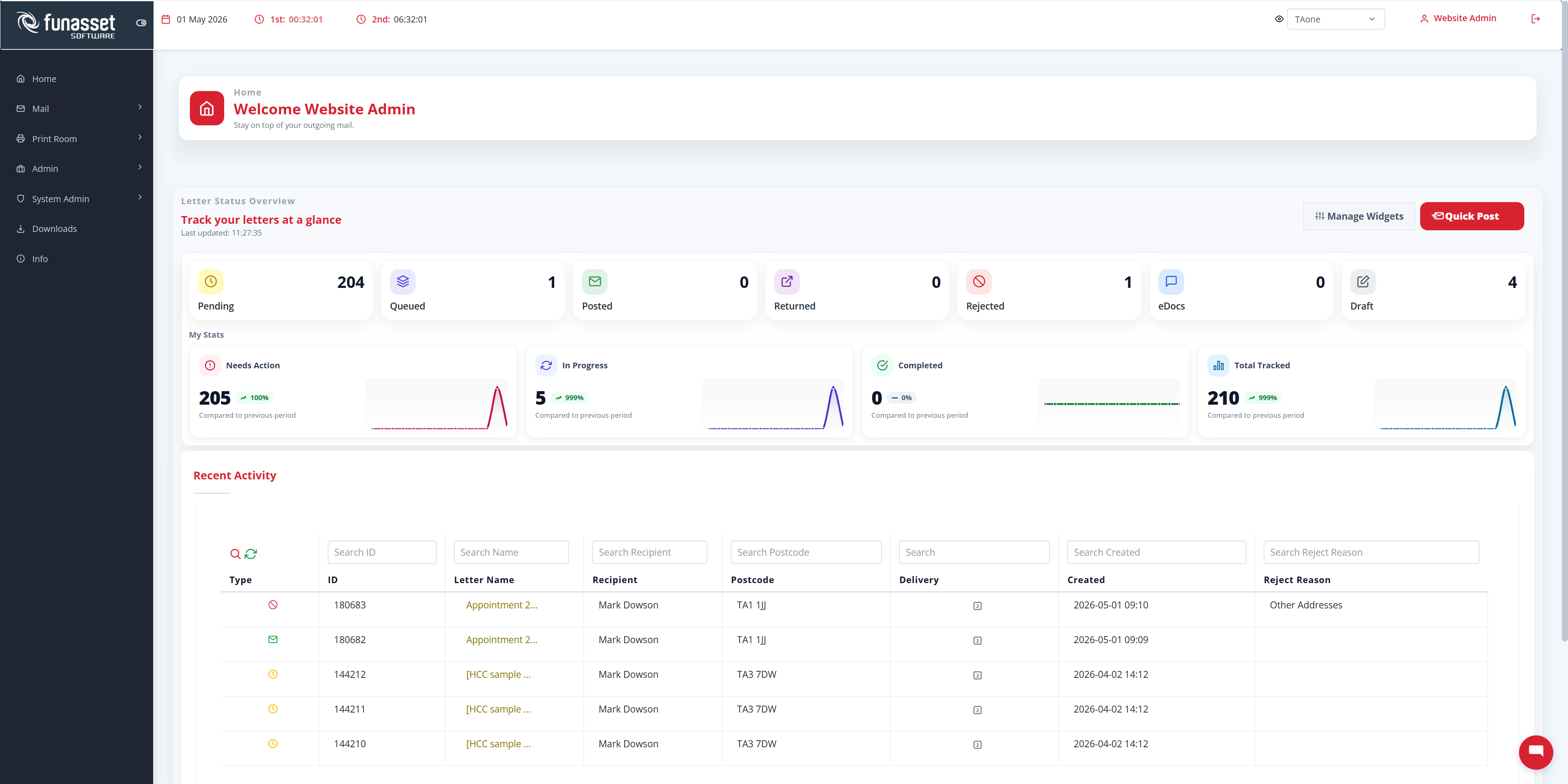
The Omnicomm Web Interface allows authorised users to create, upload and submit communications directly through a web browser. It provides a simple way to access Omnicomm without installing additional software and is ideal for individual or occasional communications. It also management and administration functionality.
Print Client
The Omnicomm Print Client appears as a Windows printer, allowing users to send documents to Omnicomm directly from existing applications. Users simply print to Omnicomm instead of a local printer, with the document automatically transferred for processing and delivery.
Drop Folder
The Omnicomm Drop Folder enables documents generated by other systems to be submitted automatically. Files placed into a designated monitored folder are collected by Omnicomm and passed into the appropriate workflow, making it ideal for scheduled and batch processing.
API
The Omnicomm API enables direct integration with other software and business systems. Applications can submit communications automatically as part of an existing workflow, making the API particularly suitable for high-volume, transactional and fully automated communication processes.
Core Capabilities
Physical Mail Management
Send letters without each user needing to print, fold, insert, frank or post them manually.
Digital Delivery
Use email, SMS, WhatsApp and other electronic channels for faster, lower-cost communication.
Templates and Brand Control
Maintain consistent wording, layout, logos, stationery and presentation across departments.
Address Validation
Reduce returned mail by checking addresses before documents are produced.
Mail Sorting and Mailmark Support
Prepare mail in a way that helps organisations access better postal rates, including Royal Mail Mailmark.
Same Recipient Combining
Combine multiple letters for the same recipient into one envelope to reduce postage, paper and handling.
Tracking and Reporting
Combine multiple letters for the same recipient into one envelope to reduce postage, paper and handling.
Secure Administration
Manage users, permissions, queues, print jobs and reporting through a central administrative interface.
Centralised Output
Central print system means no requirement for office or department printers making it perfect for home workers.
Proven Sectors
Just some of the industry sectors where Omnicomm is already successfully used
Healthcare
Omnicomm helps NHS trusts, hospitals, clinics and healthcare providers streamline patient and organisational communications, improving efficiency while supporting both physical and digital delivery.
Local Government
Omnicomm helps councils and public sector organisations simplify resident and stakeholder communications, reducing administration while bringing physical and digital delivery into one managed process.
Business
Omnicomm helps businesses manage customer and supplier communications more efficiently, automating document delivery while supporting physical mail, email and digital communication from one platform.
From Document Creation to Delivery
Omnicomm provides organisations with a practical way to manage the complete journey of a communication, from the point at which a document is created through to its final delivery.
Users can submit communications manually, continue printing from familiar applications or allow existing systems to generate and send documents automatically. Omnicomm then provides the processing layer that brings those different sources together and manages how each communication is delivered.
The result is a flexible communication solution that can be used across an organisation while adapting to existing systems, workflows and operational requirements.